· 5 min read
Feedback link generator: get your personalized link in minutes
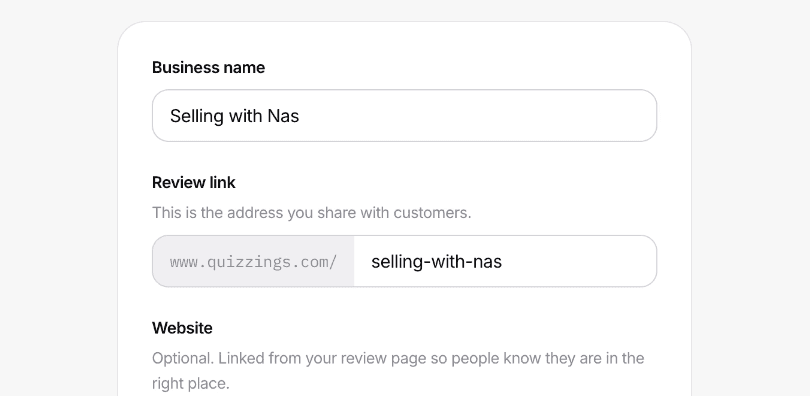
In short:Quizzings' feedback link generator turns your business name into a personalized link, editable before you save it, the moment you sign up; customers open it, leave a rating and a comment with no account of their own, and the link never changes once it has been shared.
A feedback link generator is a tool that gives a business one shareable web address customers can open to leave feedback, typically a rating and a few words, without creating an account or filling out a multi-page form before they even get to the question. Quizzings' generator builds that link from your business name automatically, lets you edit it before you save it, and has it ready to share the same day you sign up, as the screenshot above shows: type a name, and the link on the right updates as you go.
What a feedback link generator actually does
The job is narrower than the name might suggest: it has to turn "I want customer feedback" into one URL you can put in an email, a text message, or even printed on a receipt. That link has to be short enough to read aloud without stumbling over it, has to work without the customer installing anything on their end, and has to lead somewhere that takes well under a minute to fill in, because a link that asks too much of the person opening it simply doesn't get used, and an unused link isn't a feedback tool at all. It's just a page nobody ever visits.
That's the entire design brief behind Quizzings' generator: one link, no account required for the person receiving it, and a form that asks for a rating and a comment and genuinely nothing else. Research on form design consistently backs this up outside the reviews space too; Baymard Institute's analysis of checkout forms found that completion rates drop noticeably for every unnecessary field added beyond the essentials, and the same underlying principle holds just as true for a feedback form as it does for a checkout page.
How to get your feedback link with Quizzings
- Sign up and type your business name. As you type, Quizzings suggests a link from it automatically, so a business called Hearthline gets offered
quizzings.com/hearthlinewhile the founder is still finishing the name field. - Edit the link if you want a different one. The suggested link stops updating the moment you touch it by hand, so you're free to shorten it, rename it entirely, or match it to something you already use on another platform.
- Save it. That's the whole flow from start to finish: no domain to buy separately, no DNS records to configure, and no code to write yourself. The link is live and ready to share the moment the form submits successfully.
There's no separate "generate" button hiding somewhere else and no waiting period after you save. The link exists the instant your business record does, because it's derived directly from that same record rather than being created as a separate step afterward. Once it's live, our guide on how to ask for a review covers the wording and timing that actually gets people to use it.
What makes it yours, not a generic form
The link isn't a bare, unbranded form with no context around it. It opens on a small header carrying your business name and logo, so the person filling it in knows exactly who they're leaving feedback for before they type a single word. If you added a website link when you signed up, that's shown there too, as a quiet confirmation for the reviewer that they've landed in the right place rather than on some unrelated survey tool.
Nothing about the link itself has to match your full brand name either. The generator suggests one based on what you type, but you're free to make it shorter, punchier, or more memorable, as long as no other business on Quizzings already holds it. It's worth spending a moment getting this right the first time, because once you're sharing it with real customers, changing it later breaks every copy of the link already sent out in old emails, texts, and bios.
Where to send it once it's generated
The link works anywhere plain text already works, so you don't need any special integration to start using it right away:
- Email or Slack, dropped straight into a short message: "Would you mind leaving a quick review? It takes about a minute and there's no account to create: [link]."
- Right after a support conversation, sent while the interaction and the relief of getting something resolved are both still fresh in the customer's mind.
- Inside your own product, wherever you already talk to customers day to day, whether that's a dashboard notification or a simple email footer.
There's deliberately no built-in QR code generator or email sender in Quizzings yet. A feedback link is already something you can paste anywhere text goes, and Quizzings doesn't try to reinvent how people send a URL when the existing tools people already use, from email to Slack to SMS, already do that job well.
What happens after someone opens it
They land on the header described above, pick a star rating, write a few words about their experience, and submit, all without creating an account, remembering a password, or installing an app. It works the same way on a phone as it does on a desktop, which matters in practice because most of these links get opened from a text message or an email while someone is out and about on mobile rather than sitting at a laptop. The moment a review is submitted, it's published immediately and shows up wherever you've chosen to display it on your own site.
Turning the link into something visitors see automatically
The link by itself is enough to start collecting feedback, but pairing it with the widget is what puts that feedback in front of people who are still deciding whether to become a customer in the first place. Paste one script tag, or hand a prompt to a coding agent as described on our how it works page, and every new review appears on your site automatically from then on, with no redeploy needed each time the next one comes in.
Frequently asked questions
Is Quizzings' feedback link generator free?
Yes. Generating your link is part of signing up, and the free trial covers your first 10 reviews with no card required upfront. The link keeps working the same way after the trial ends too; new reviews simply pause landing on your public site until you pick a plan, and nothing you've already collected is ever lost in the process.
Can I customize my feedback link?
Yes. Quizzings suggests a link from your business name as you type it, but the field stays fully editable, so you can shorten it or change it entirely before saving, as long as it isn't already taken by another business on the platform.
Do my customers need an account to use the feedback link?
No. Anyone holding the link can open it and submit a rating and a comment directly, with no login, no signup, and no app for them to install on their end.
Can I change my feedback link after I've already shared it?
You can, through your account settings, but it isn't recommended once you've sent it to real customers, because every copy of the old link already sitting in an email, a text message, or a bio stops working the moment you change it. It's worth taking the time to get the link right before the very first time you share it publicly.
Can I generate more than one feedback link?
That depends on your plan. Free and Pro both cover one business and therefore one link. The Team plan supports unlimited sites, each with its own separate feedback link, which is useful if you're running more than one brand or more than one physical location under the same account.
Does the feedback link collect anything other than a star rating?
Yes. Every submission pairs a 1–5 star rating with a written comment, and that combination is what makes it a genuine review rather than just a bare score with no context behind it. It's this pairing that shows up on your public reviews page and inside the widget, giving visitors both the number and the reasoning behind it.