· 8 min read
The best customer reviews platform for a vibe-coded website
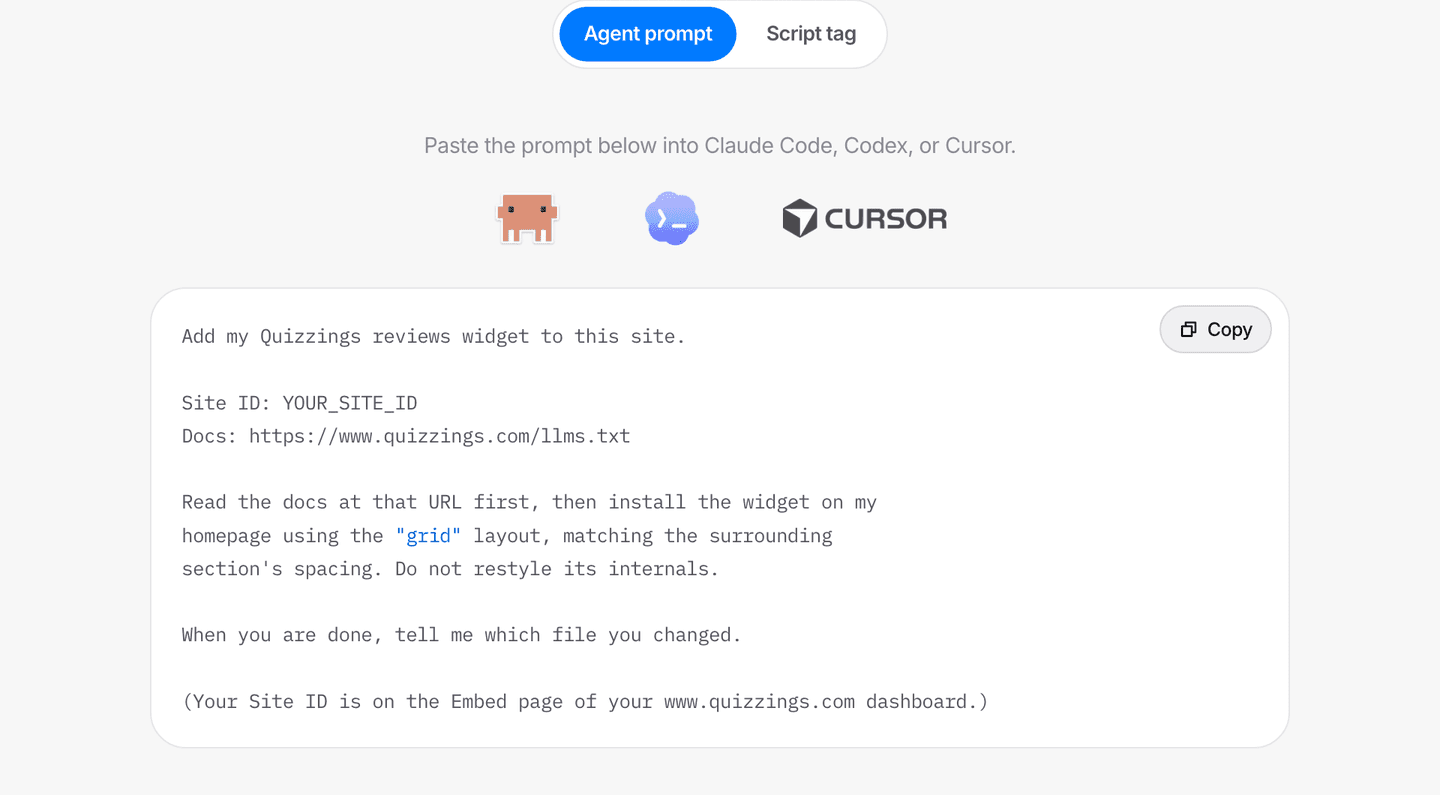
In short:The best customer reviews platform for a vibe-coded website is one you can install by pasting a prompt into the same agent that built the site. Quizzings publishes its install guide as plain text at quizzings.com/llms.txt, so Claude Code, Cursor, Codex, Lovable, v0 or Bolt can read it and add the widget themselves. The integration is one script tag and one placeholder div, with no npm package and no build step, and the widget renders inside a sealed style boundary so restyling your page never breaks it.
If a coding agent built your website, your reviews widget should install the same way you build: by describing what you want. Not by downloading a plugin, not by hunting through a docs site for a snippet, and not by adding an npm package your builder's sandbox may refuse to install.
That is the case for Quizzings on a vibe-coded site. You paste one prompt into the agent that already has your codebase open, and the reviews are on the page. The screenshot above is the whole install: pick the Agent prompt tab, copy, paste.
Why does a vibe-coded site need reviews sooner than other sites?
Because a visitor is silently deciding whether there is a real business behind the page, and a fast-built site gives them fewer signals than a slow-built one.
Sites generated from a prompt tend to launch with the same furniture: a clean hero, three feature cards, a pricing table, a footer. That is a good default, and it is why these tools work. It also means:
- Your page looks structurally like a thousand others. Nothing on it is evidence that anyone has ever bought from you.
- The usual proof is missing. No case studies, no press, no "trusted by" row you can honestly fill in.
- Reviews are the one thing a competitor cannot copy. They cannot re-run your prompt and get your customers' words.
Reviews are also the only copy on your site allowed to say things about you that your own marketing cannot.
What should you look for in a review platform for an AI-built site?
Four things. Most platforms miss at least two.
| What a vibe-coded site needs | What most review platforms ship | |
|---|---|---|
| Install | A prompt an agent can execute | A plugin for WordPress or Shopify |
| Docs | Plain text at a fixed URL, written for a model | A docs site with navigation and cookie banners |
| Dependencies | None, just one script tag | An npm package, sometimes a build step |
| Styling | Sealed off from your CSS, both directions | A stylesheet that inherits your page's chaos |
Two of those rows matter more than they look:
- Dependencies. In a browser-based builder, a package has to be resolved, installed and rebuilt. Some sandboxes will not, or will and then break something else. A script tag is just HTML, and every builder can emit HTML.
- Styling. On a vibe-coded site the CSS changes constantly, because you keep asking for a different colour or a tighter layout. A widget that inherits your page's styles will look wrong roughly every third prompt.
How do you install it? Paste one prompt
This is the prompt, printed on the Embed page of your dashboard with your site ID already filled in:
Add my Quizzings reviews widget to this site.

Site ID: YOUR_SITE_ID
Docs: https://www.quizzings.com/llms.txt

Read the docs at that URL first, then install the widget on my
homepage using the "grid" layout, matching the surrounding
section's spacing. Do not restyle its internals.

When you are done, tell me which file you changed.
Paste it into Claude Code, Cursor, Codex, or the chat in whatever builder you use. Each line is doing a job:
- The docs URL. Plain text, no navigation, no marketing. Just the attribute names, the three layouts, the JSON shape, and a checklist telling the agent to confirm your site ID and load the page afterwards to check reviews render.
- A live route, not a scraped copy. The agent reads what is true today instead of what was true when its training data was built. That is the single biggest failure mode for agent-installed third-party code.
- The layout word. Swap
"grid"for"list"or"badge". Grid suits a homepage section, list suits a dedicated reviews page, badge is a compact score block for a pricing page, sidebar or footer. - "Do not restyle its internals." Stops an eager agent trying to override styles it cannot reach anyway.
Change "my homepage" to wherever you want the reviews.
What does the agent actually add to your site?
Two things, and you can read them before you paste anything:
<!-- Paste this once, anywhere in the page. -->
<script
  src="https://www.quizzings.com/widget.js"
  data-site="YOUR_SITE_ID"
  data-layout="grid"
  data-limit="6"
  defer
></script>

<!-- Paste this where the reviews should appear. -->
<div data-quizzings="reviews"></div>
- The script loads the widget. It can go anywhere on the page.
- The div is the placeholder. Its position decides where reviews appear.
data-limitis how many to show, from 1 to 50.- No API key. The feed is public read-only data.
- Your site ID is not a secret. It can only fetch reviews already published on your public reviews page, so it is safe in a public repo.
Prefer your own components? The docs carry a paste-in React component that fetches the same JSON and outputs unstyled markup. There is no npm package for that route either.
How do you add it in Lovable, v0, Bolt, Replit, Cursor or Claude Code?
Same two snippets underneath. The route depends on whether you talk to your builder in chat or edit files directly.
- Chat-based builders (Lovable, v0, Bolt, Replit Agent): paste the prompt into the chat as it is. If yours cannot fetch a URL, paste the script-tag snippet instead and say where the reviews should go.
- Agents with repo access (Claude Code, Cursor, Codex): paste the prompt into the terminal or chat. These have the easiest job, because they can read your layout and match the surrounding spacing.
- Framer, Webflow and Squarespace: these want the snippet in an embed or custom-code block, positioned where the reviews should appear.
One caveat for every chat-based builder: custom scripts usually do not run in the preview pane, because previews render in a sandboxed frame. If the space looks empty, publish and check the real URL before assuming it is broken. Our step-by-step widget install guide runs through the rest of the checks in order.
Will it break when you restyle the site?
No. The widget renders in a shadow root, which is a sealed style boundary.
- Your CSS cannot reach in. Ask your agent to restyle the whole page and the reviews section is structurally immune.
- Its CSS cannot leak out. It will not disturb anything you built.
- Text colour is inherited on purpose, so it reads correctly on light or dark backgrounds with nothing to configure.
- Two attributes cover the rest:
data-accentfor the star colour,--quizzings-fonton the placeholder for your own typeface.
It also has no dependencies, so there is nothing in your package.json to go stale and no version bump to derail a rebuild.
What if your builder regenerates the page?
The snippet can get swept away with everything else on that page, the same as any other hand-added markup. This is the one honest weak point, and it has a fix that takes seconds:
- Re-paste the install prompt. Fastest option, works every time.
- Keep the widget in a component you do not regenerate.
- Add a line to your
AGENTS.mdorCLAUDE.md: tell agents not to remove the Quizzings script tag. That ends it permanently.
How do you get the reviews in the first place?
You send a link. The widget only displays reviews, so something has to collect them, and this is the part that is actually work.
- You get a review link built from your business name, something like
quizzings.com/hearthline. - Customers leave a rating and a comment with no account. That is the difference between a 40% response rate and a 4% one.
- Published reviews flow straight into the widget. There is a moderation queue in between.
- You can install the widget before you have any reviews. It fills in by itself, though it is worth collecting a handful first.
One rule before you paste anything into your site: link to your public reviews page, never to the blank review form. Anyone reading your website is a visitor, not necessarily a customer, and a public link to the form invites ratings from people who never bought anything. The widget already links to the right one.
Our guide on how to ask for customer reviews covers the timing and wording that gets replies, and the feedback link generator post covers setting the link up.
Do the reviews help your SEO?
They make your rating machine-readable. They do not guarantee stars in search results.
- Reviews render on your own domain, as content search engines attribute to you rather than to us.
- The widget emits Schema.org
AggregateRatingmarkup once you have a published review, so crawlers can read your average and review count. - Google has limited review rich results for reviews a business shows about itself since 2019. Treat the markup as machine-readable, not as a promised star snippet.
- You also get a server-rendered public reviews page at
quizzings.com/your-name/reviews, which is indexable and worth linking from your site and bios.
The bigger point is ownership. The alternative is social proof living on someone else's platform, at a URL you do not own, subject to a pricing change you do not control. Our piece on who should own your customer reviews makes the full case.
Start with the prompt
Start a free trial with no card, copy the prompt from the Embed page, and paste it into the agent that built your site. Then send your review link to the last five customers you had a good interaction with. The widget will be live before the first reply comes back.
Frequently asked questions
What is the best review platform for a site built with AI?
For a site built by a coding agent, the useful test is whether that same agent can install it. Quizzings publishes its complete integration guide as plain text at quizzings.com/llms.txt and gives you a ready-made install prompt, so Claude Code, Cursor, Codex, Lovable, v0 or Bolt can read the docs and add the widget without you writing code. The integration is one script tag and one placeholder div, with no npm package and no build step, which is what makes it work inside browser-based builders that cannot install dependencies.
Can Claude Code or Cursor install a reviews widget for me?
Yes. Copy the install prompt from the Quizzings Embed page and paste it into the agent. It contains your site ID and a link to plain-text docs written for a model to execute, including the exact attribute names and a checklist that tells the agent to confirm the site ID with you and load the page afterwards to verify reviews render. The agent works out which file to change, adds the script tag and the placeholder, and tells you what it edited.
Will a reviews widget break my AI-generated site's styling?
No. The Quizzings widget renders inside a shadow root, a sealed style boundary: your page's CSS cannot restyle the widget's internals, and the widget's CSS cannot leak into your page. That matters on a vibe-coded site because the CSS gets rewritten often. Text colour is inherited deliberately, so it reads correctly on light and dark backgrounds, and you can set an accent colour with data-accent or your own typeface with the --quizzings-font variable.
Do I need an npm package or a build step?
No. There is no npm package to install and no build step. The universal install is a script tag plus a div, which works on plain HTML, in any site builder's custom-code block, and inside a React or Next.js app. If you would rather render reviews with your own components, the docs include a React component you paste into your project, which has no dependencies beyond React itself.
What happens if my builder regenerates the page?
If you ask a builder to rebuild a page from scratch, hand-added markup can be removed along with everything else on it, including the widget snippet. Re-pasting the install prompt puts it back in a few seconds. To stop it recurring, keep the widget in a component you do not regenerate, or add a line to your project's AGENTS.md or CLAUDE.md telling agents not to remove the Quizzings script tag.
Is my site ID a secret I should keep out of my repo?
No. The site ID can only read reviews that are already published on your public reviews page, so it is safe in your HTML and in a public repository. It is not an API key and it grants no write access. If you would rather keep it in an environment variable anyway, nothing about the widget stops you.
Do reviews appear on my site without me redeploying?
Yes. The widget checks for new reviews every minute while a visitor has the page open, and again whenever they return to the tab, so a newly published review appears within a minute or two with no redeploy and no prompt. Tabs open in the background make no requests at all, and the widget only redraws when the reviews have actually changed.